
Back
Download pocket report as excel or csv
Pocket Management
Download pocket report as excel or csv
Export your pocket’s full transaction history into Excel or CSV format for detailed review, backup, or financial reporting. Perfect for budgeting, audits, or sharing with your team or accountant.
1.Open the pocket you want to export, tap the menu button at the top, and select “Pocket Report.”
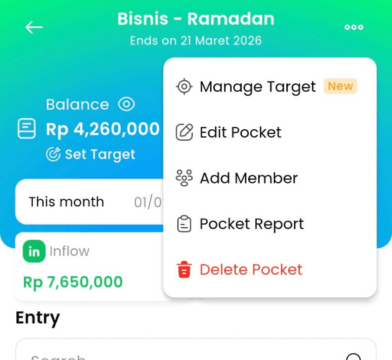
2.Tap “Request New Report”, choose the time period and file format (Excel or CSV), then tap Submit.

3.Once your report is ready, it will appear in the list. Tap the Download button to get the file.

4.Save the file to your phone or share it to your laptop for further use.
